A practical guide for parents and caregivers
A morning routine for kids, in six picture steps.
Getting dressed, breakfast, shoes, out the door. A visual schedule puts the plan where your child can see it, one familiar activity at a time.
Use this example as a starting point, on paper or in Professor Ary: Visual Routine. Change the order to match your household. You do not need to fit your morning to an app.
See the six-step exampleChoose the steps that happen in your home.
Keep each cue to one activity. For a child who is not reading yet, pair the words with a picture they recognize. Start with fewer steps if six feels like too much.
Get dressed
Choose a picture of the clothes your child will put on. Keep choosing clothes separate if that needs its own step.
Eat breakfast
Use a familiar breakfast picture. The cue names the activity; it does not set a target for how much to eat.
Brush teeth
Use a toothbrush picture and stay available for any help your child needs.
Put on shoes
Show shoes as their own task. Add a coat as another step if that fits your morning.
Pick up the bag
Use a bag picture as the cue. An adult can check that the things needed for the day are inside.
Leave home
Use the door or another familiar picture as the final step. An adult stays responsible for leaving safely.
This is an example sequence, not a timed target. Add, remove or reorder steps around your family’s needs.
Show what is happening now, then what comes next.
At breakfast, point to the breakfast picture. Keep the toothbrush picture visible as the next step. When breakfast is finished, move forward together.
In Visual Routine, the child view keeps one current step and the next step on screen. A visual timer is optional. Use it when seeing time is useful; the morning does not have to become a race.
If a full routine is too much for that moment, First / Then gives you a two-step plan. Adults can pause or adjust a run as needed.
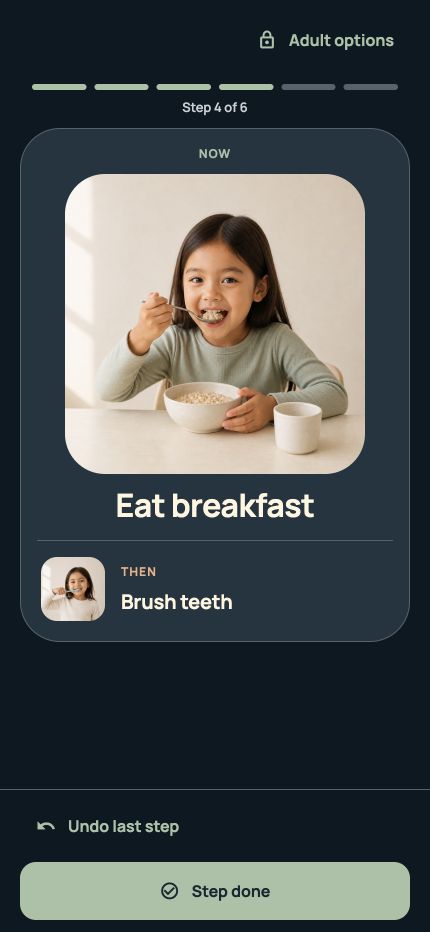
Make the plan your own in Visual Routine.
- Choose Morning. Review the template before using it with your child.
- Adjust the picture steps. Match their order to your actual morning. Preview the child view together.
- Follow one step at a time. Mark each step done when you are ready to move on.
- Keep the routine for tomorrow. Completing a run leaves the saved routine available to use again.
Prefer a plan on the fridge? The app can export a routine as an image or PDF for A4 or Letter paper. The free export includes Professor Ary branding.
Before you start
Do we need an account or an internet connection?
No account is required for the free app. Once installed, local routines work offline. Downloading the app and making or restoring purchases need a connection.
What is included for free?
One child profile, two active routines with up to eight steps each, starter pictures, First / Then, timers, local reminders and branded image or PDF export. Routines+ is optional for expanded features.
What if our morning changes?
Change the order or use a shorter plan. A visual schedule is a tool for showing the next activity, not a promise of a particular behaviour or outcome. Visual Routine does not diagnose, treat or replace professional care.

Try your first morning routine.
Start free on iPhone or iPad. Two active routines, no account, no ads.
Get Visual Routine on the App Store